Your next podcast cover can start with the material you already have: an episode title, a script, a host photo, or artwork from your previous release. AI cover art brings those inputs together so you can explore a visual direction and create artwork that belongs to your show.
The key is giving the AI a clear job. Which idea should the image communicate? Who should appear? Which words belong on the cover? In this guide, you’ll turn those decisions into a practical brief, create cover variations with PodcastorAI, and use adaptable prompts for interviews, mysteries, and casual talk shows.
Have an episode ready? Open the PodcastorAI Podcast Cover Generator and build your cover as you follow along.
1. What Is AI Podcast Cover Art?
AI podcast cover art is artwork generated from text instructions, images, or reference materials to represent a podcast show or episode.
Decide which type you’re making before writing your prompt:
| Artwork | Main job | What to emphasize |
|---|---|---|
| Show cover | Give the whole podcast a recognizable identity | Show title, recurring hosts, signature colors, and an enduring visual concept |
| Episode cover | Introduce a particular conversation or story | Episode topic, featured guest, or one image that captures the discussion |
A show about work and everyday life might use the same title treatment across its covers while changing the central image for each episode. An episode about late‑night work messages could feature a glowing phone beside a cup of tea; a conversation about commuting could use a train window and a city skyline.
2. What Makes Good Podcast Cover Art?
A useful cover gives listeners a quick sense of the show and remains recognizable in a small feed preview. Make four decisions:
| Decision | Practical direction |
|---|---|
| Main subject | Choose a host, object, or scene that carries the idea. Give it more visual space than supporting details. |
| Title | Specify the exact wording and where it should sit. Keep secondary text short. |
| Color and contrast | Choose a small palette and separate the title from the background with strong contrast. |
| Series identity | Keep recognizable elements consistent: title placement, host imagery, typography, or a signature color. |
Match the visual focus to the reason people listen. A personality‑led interview may benefit from recognizable faces. An investigative story may work better with a single evocative object. An educational episode can center on a visual metaphor for the concept being explained.
3. How to Create AI Podcast Cover Art with PodcastorAI
Sometimes, the hardest part of creating podcast artwork isn’t using a design tool. It’s knowing what to ask AI to generate. You might have a color palette in mind but struggle to describe the composition, or you might write a detailed prompt only to receive an image that doesn’t reflect your episode.
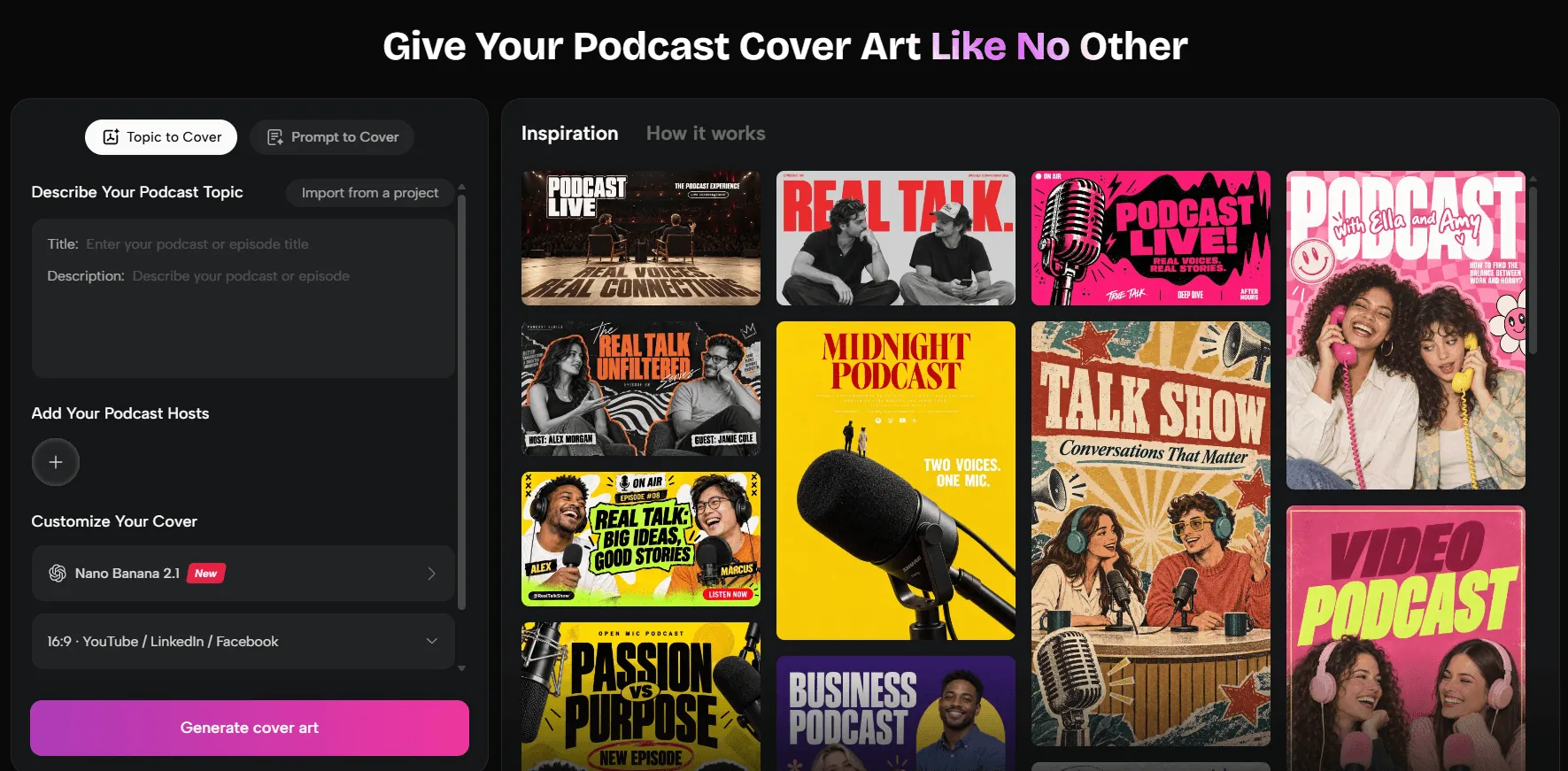
Instead of adding more adjectives to your prompt, start with the content you already have. With the PodcastorAI Podcast Cover Generator, you can use your podcast title, script, host images, and reference materials to develop a visual direction.
Step 1: Identify Your Episode’s Core Message Before Generating an Image
If you give AI an entire podcast script without explaining what matters most, it may focus on a minor detail instead of the main topic.
Before creating your cover, try summarizing the episode’s central idea in one or two sentences. For an interview, think about the main question being discussed. For a storytelling podcast, identify the emotion or scene that best represents the story. For an educational episode, focus on one concept that captures the subject.
Then turn that idea into a short creative brief containing three elements:
- Subject: What should appear in the image?
- Style: What visual mood or aesthetic should it have?
- Composition: Where should the main subject and title appear?
For example, instead of entering “Create a professional podcast cover,” you could describe a minimalist technology podcast cover featuring an abstract digital network, deep blue tones, and clear space for a bold title.
In PodcastorAI, you can start with an existing podcast project or provide relevant information, such as the episode title, description, and script, to guide the creative direction.
You don’t need to turn every detail into a visual element. If an episode covers several topics, the artwork doesn’t have to illustrate all of them. Choosing one strong concept and building the design around it is usually more effective than simply asking AI to create something “professional, creative, and eye‑catching.”
Step 2: Use Existing Assets to Maintain Your Podcast’s Visual Identity
If you’ve already published several episodes, you don’t need to establish a completely new visual style every time. Existing host photos, previous covers, and brand assets can all help guide your next design.
PodcastorAI allows you to work with host assets from your project and reference relevant images using @material. Depending on your needs, you can provide existing artwork or other visual references to help establish the direction of a new cover.
Before using these materials, decide which elements should remain consistent. Your podcast’s typography, primary colors, and recognizable host imagery may be important parts of its identity. Background scenes, supporting graphics, and secondary colors can change to reflect each episode.
Consistency doesn’t mean duplication. For an ongoing podcast, the goal is to make each new cover feel familiar enough to belong to the same show while still communicating something different.
If you’re using host photos as references, review the generated faces carefully. Reference images can help guide the result, but AI may not reproduce every facial feature accurately.
Step 3: Choose the Right Aspect Ratio and Generation Settings
Once you’ve established the content and visual direction, it’s time to configure your image settings.
PodcastorAI offers options for image models, aspect ratios, resolutions, and the number of generated images. You can choose different image resolutions and dimensions based on where your cover will be published. A high‑resolution square image may be suitable for your main podcast artwork, while other display contexts may call for different specifications. Selecting the appropriate settings during generation can reduce the need for additional resizing later.
However, technical settings are only part of the process. You also need to consider where the title will appear, whether the host portraits overlap important text, and whether the background leaves enough room for the main message.
If you’re still exploring design directions, generate several variations first. Finding the right overall composition and style is often more valuable than spending too much time adjusting minor settings in the first round.
Step 4: Compare Variations and Refine the Details
Your first AI‑generated image may not be your best option. Sometimes the colors look right, but the subjects are poorly positioned. Other times, the composition works well, but the artwork doesn’t communicate the episode’s main idea.
You don’t necessarily need to start over. Instead, identify what isn’t working and make targeted adjustments.
- If the cover doesn’t reflect the topic, revise your description to emphasize the central concept.
- If the image feels crowded, reduce the number of decorative elements and request a simpler composition.
- If the overall design works but the colors don’t match your brand, focus on adjusting the palette rather than changing everything.
You can also compare different creative approaches: one that emphasizes the host, another that focuses on the episode topic, and a third that combines both. When reviewing these variations, don’t just ask which looks best. Consider what each design communicates to a potential listener.
If you regularly create podcast artwork, keeping your preferred versions and prompt notes can also save time. When a later revision moves too far from the original direction, you’ll have a useful reference to return to.
Step 5: Review Your Cover Before Publishing
Once you’ve chosen a design, don’t rush to publish it. AI‑generated artwork can look convincing in a large preview while revealing problems when displayed at a smaller size.
- Start by checking the text. Generative AI can produce misspelled titles, incomplete letters, or inconsistent typography. Review important wording carefully and, if necessary, add or correct the title using a design editor.
- Next, inspect the people and visual details. Pay particular attention to host portraits, hands, background objects, and other elements that may contain unusual shapes or distortions.
- Finally, preview the artwork at a smaller size to make sure the main subject remains recognizable. Check that the dimensions, file format, and file size meet the requirements of your intended podcast platform.
Once everything looks right, export your final cover art.
4. AI Cover Art Ideas and Prompts for Different Podcast Genres
Different podcast genres call for different visual approaches. Interview shows can emphasize hosts and bold typography, mystery podcasts can use dramatic lighting to build atmosphere, and casual talk shows can express their personality through bright colors and playful graphics.
If you’re unsure where to start, the following prompts offer three creative directions you can adapt to your own podcast.
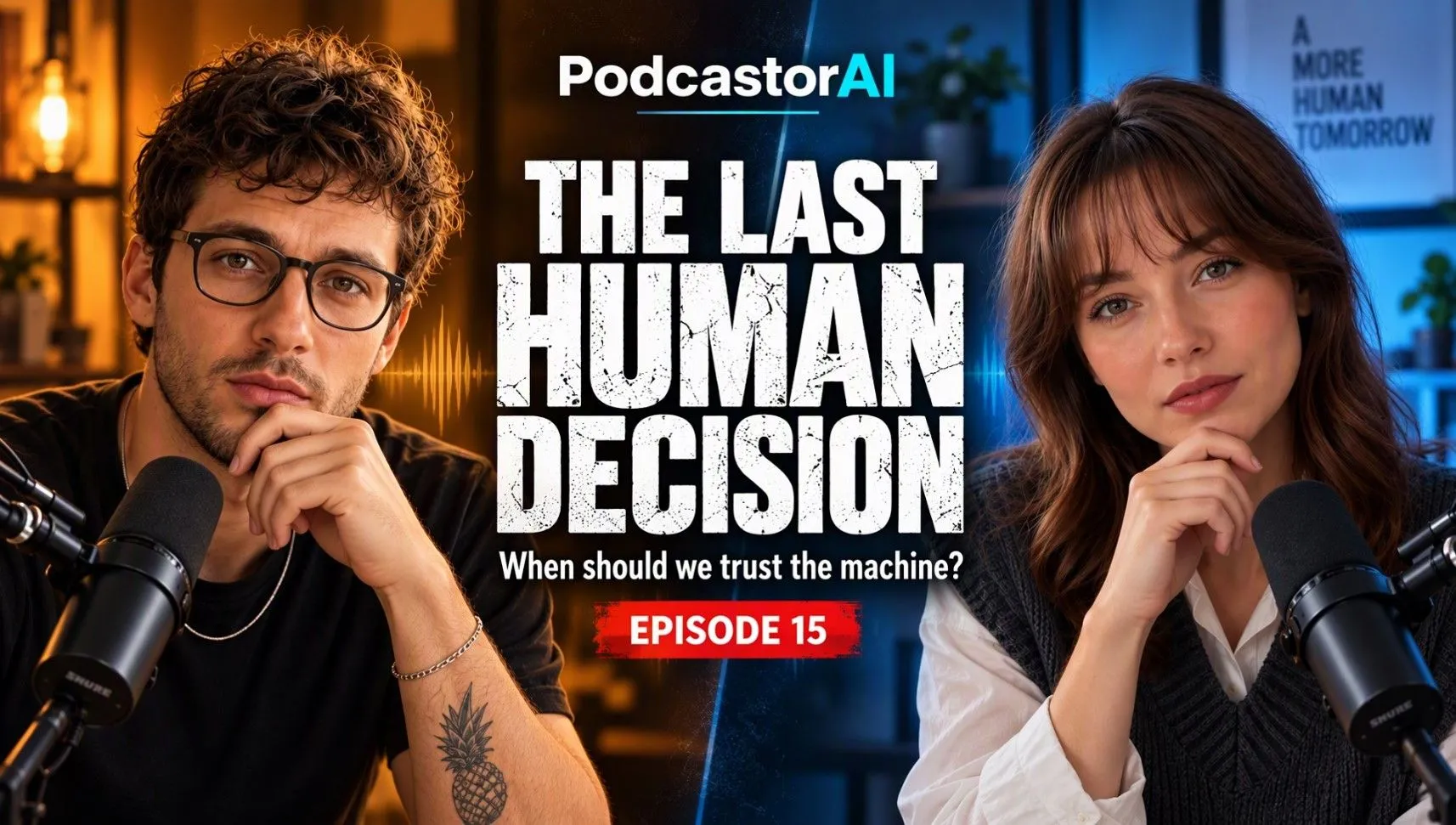
Interview Podcasts: Highlight the Hosts and Main Topic
For interview and discussion‑based podcasts, the hosts or guests can serve as the main visual focus. A two‑person composition, prominent title, and contrasting background colors can suggest conversation and make the subject feel more engaging. This approach works particularly well for business interviews, technology discussions, and personality‑driven shows.
Prompt:
“Create podcast cover art for a thought‑provoking interview show featuring two hosts. Use a cinematic split‑color background with warm orange and deep blue lighting, realistic host portraits, and large bold white typography in the center. Keep the composition balanced, modern, and easy to read.”
Tips: If your podcast features regular hosts, upload their photos as references to help maintain a consistent appearance. Both people don’t need to occupy equal space in the composition. You can adjust their positions based on the episode’s focus while leaving enough room for a clear, readable title.
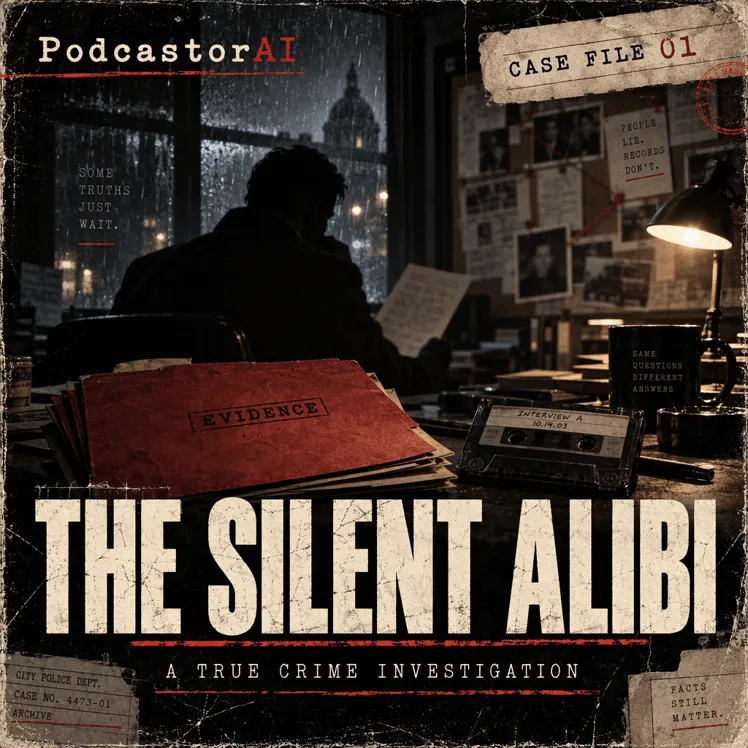
Mystery and True Crime Podcasts: Build Suspense with Lighting and Collage
Mystery and true crime podcasts can create a sense of intrigue through dark backgrounds, silhouettes, archival photographs, and paper textures without revealing the story itself. Subtle red accents and distressed typography can add tension and give the artwork a cinematic, investigative feel.
Prompt:
“Create cinematic cover art for a true crime podcast. Show a mysterious investigation room with case files, scattered photographs, newspaper clippings, and a shadowy figure. Use dark tones, vintage paper textures, subtle red accents, and dramatic lighting. Add a large distressed bold title as the main visual focus.”
Tips: Collage‑style designs can quickly become cluttered. Choose one central element, such as a case file, silhouette, or mysterious object, and let the surrounding details support the atmosphere. Make sure the title contrasts clearly with the dark background so it remains readable at smaller sizes.
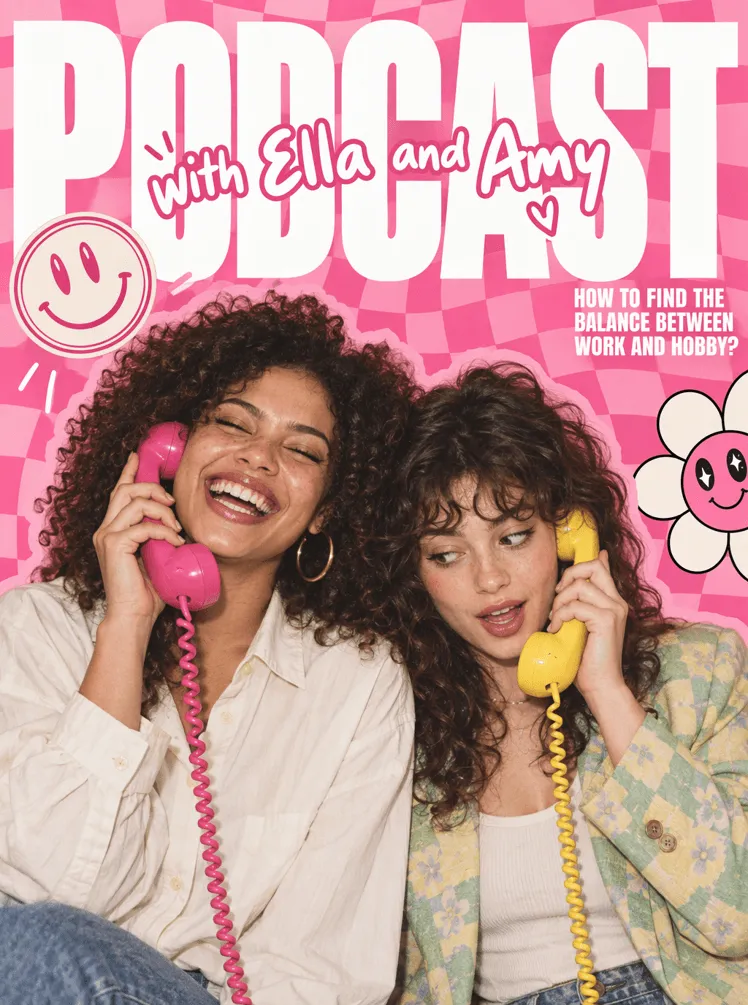
Casual Talk Podcasts: Express Personality with Bright Colors
Lifestyle, friendship, and casual conversation podcasts often benefit from a more approachable visual style. Vibrant colors, expressive portraits, and hand‑drawn elements such as flowers, hearts, and smiley faces can create an energetic, welcoming mood. Bold typography can further strengthen the show’s personality.
Prompt:
“Create playful podcast cover art for a casual lifestyle talk show featuring two female hosts. Use a vibrant pink color palette, expressive host portraits, bold oversized typography, and fun hand‑drawn doodles such as flowers, hearts, and smiley faces. Make the design energetic, friendly, and inspired by modern pop editorial graphics.”
Tips: Look for design inspiration in your hosts’ personalities or recurring elements of the show, such as signature clothing colors, familiar objects, or a memorable catchphrase. Avoid filling every available space with doodles. A little negative space can make the hosts and title stand out more effectively.
These prompts are starting points, not fixed templates. Adjust the number of people, color palette, background, and visual elements to match your podcast. You can also incorporate host photos and existing brand assets to make the results more recognizable. For any important text, check the generated lettering and adjust the typography separately if needed.
5. Podcast Cover Art Sizes and Platform Requirements
Prepare your artwork for its destination. For Apple Podcasts show covers, the official specifications are:
| Specification | Apple Podcasts show cover |
|---|---|
| Preferred dimensions | 3000 × 3000 pixels |
| Dimensions accepted through RSS | 1400 × 1400 to 3000 × 3000 pixels |
| File format | PNG or JPG |
| Background | Opaque; no transparency or alpha channel |
| Placement | Keep important elements within the official template’s art safe area |
Source: Apple Podcasts Show Cover guidelines.
Check the downloaded file’s actual pixel dimensions. If it is larger than the destination’s accepted maximum, resize the final artwork before uploading.
For shows hosted with Spotify, upload or replace show artwork through Settings → Update show art. Individual episode artwork is managed separately; Spotify also notes that some listening platforms display the main show artwork for every episode. See Spotify’s cover art upload instructions.
6. Common AI Podcast Cover Art Mistakes to Avoid
Use this quick check to turn a selected design into a finished asset:
| Issue | Finishing action |
|---|---|
| Incorrect title or extra lettering | Specify the exact words in your prompt; finish the typography in a design editor when needed. |
| Host appearance differs from the reference | Revisit the selected reference and the portrait instructions, then compare the next result with the original photo. |
| Artwork becomes unclear in a small preview | Enlarge the main subject, increase title contrast, or remove secondary details. |
| Series covers look unrelated | Reuse the same palette, title placement, and reference artwork across episodes. |
Use your own or authorized photos and brand materials as references. Keep the final artwork and its brief together so the next episode has a clear starting point.
7. Frequently Asked Questions
Can AI automatically generate podcast cover art?
Yes. An AI cover art generator can create visual concepts using podcast titles, descriptions, scripts, and reference images. However, you should still review the text, recognizable faces, and overall design before publishing.
Can I update my podcast cover art after publishing?
Yes. Most podcast hosting platforms allow you to update your show cover art after publishing. You can also create new artwork for individual episodes to reflect different topics or guests. When updating your cover, try to maintain recognizable brand elements, such as your logo, typography, or color palette, so existing listeners can still identify your podcast. Keep in mind that artwork changes may take some time to appear across listening platforms.
Can I use AI‑generated podcast cover art commercially?
Commercial usage depends on the AI tool’s terms, the rights associated with your reference materials, and applicable rules. Before publishing, confirm that you have permission to use any host photos, brand logos, or third‑party images included in your design.
8. Create Your Next Podcast Cover
Start with one episode idea, choose a visual focus, and add the host images or artwork you want to carry forward. A clear brief gives you a repeatable way to create covers for the next release and the episodes after it.
Create AI cover art with PodcastorAI using your topic, prompt, or existing podcast project.