
PodcastorAI is about to sound different.
Today, PodcastorAI can turn a topic, document, webpage, note, or recording into a structured script with distinct AI speakers, then help you create an audio or video podcast. With Seed Audio 1.0 coming to PodcastorAI, we are taking the next step: moving from generating voices to directing complete sound scenes.
Imagine turning your notes into a natural conversation between two hosts, with each speaker carrying a clear personality and emotional rhythm. Imagine opening a true-crime episode with restrained narration, rain outside the studio, and a sound cue that arrives at exactly the right moment. Or turning a language lesson into a role-play that feels less like a vocabulary recording and more like a real exchange.
That is what makes this new AI audio generator exciting for PodcastorAI creators.
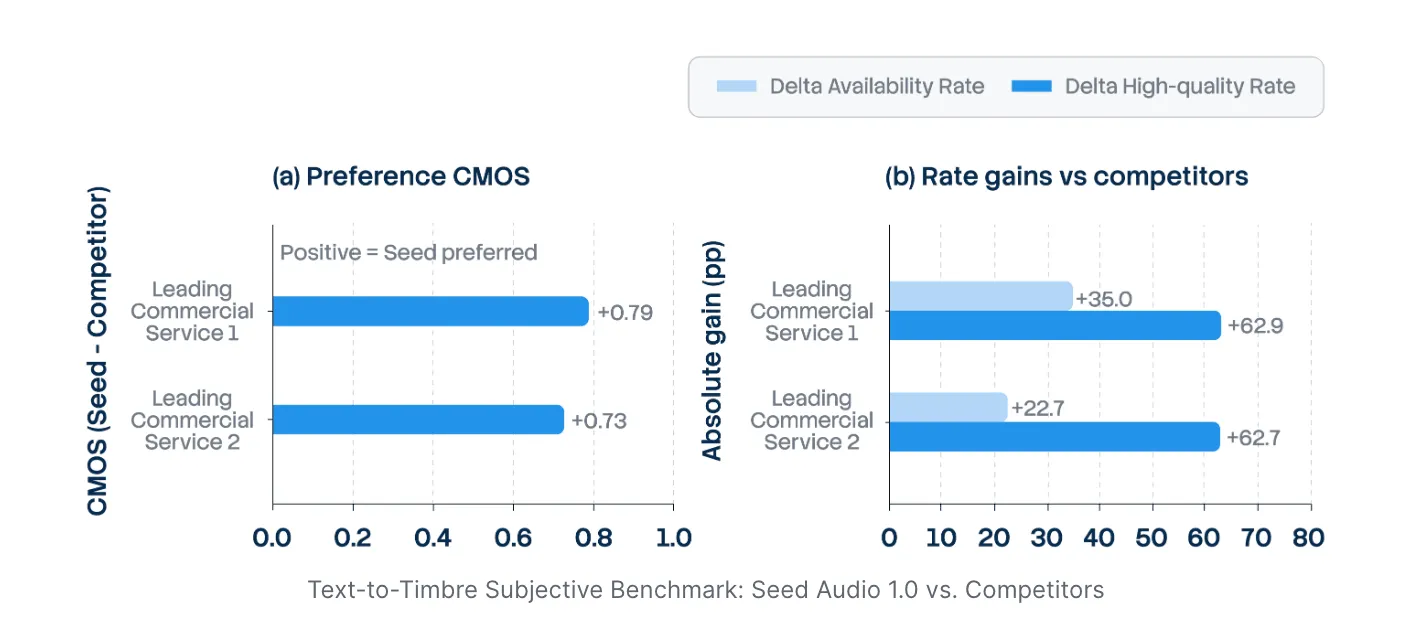
Developed by ByteDance’s Seed team, Seed Audio 1.0 can generate speech, multi character dialogue, ambience, sound effects, and other scene level audio elements within one shared context. Instead of creating every voice and sound separately, creators can describe how the whole moment should feel and let the model generate the elements together.
For PodcastorAI, this is not simply a new voice option. It expands what a generated podcast can become. Your source material can still be organized into an editable script, but the approved script can now lead to a more expressive performance with richer context, pacing, and atmosphere.
What Seed Audio 1.0 Brings to PodcastorAI
PodcastorAI already connects the major stages of podcast creation: importing source material, structuring a script, choosing speakers, reviewing the conversation, and generating audio or video. Seed Audio 1.0 strengthens the moment when that script becomes something listeners can actually experience.
Here is what we are most excited about:
-
From a script to a sound scene. Generate more than spoken lines by bringing character, emotion, ambience, and sound cues into the same creative direction.
-
More connected multi-speaker conversations. Let hosts respond within one shared scene instead of sounding like unrelated voice clips placed next to each other.
-
More expressive storytelling. Give narration, interviews, lessons, and fictional dialogue a clearer mood and performance style.
-
Less fragmented production. Reduce the need to create, source, and align every audio element across separate tools.
-
More possibilities from the same material. Turn one document or idea into a deep dive, debate, lesson, story, audio podcast, or video podcast.
You will still be able to review and refine the script before generating. Seed Audio 1.0 adds a richer performance layer without taking control of the content away from the creator.
What Is an AI Audio Generator?
An AI audio generator is a tool or model that creates audio from inputs such as text prompts, scripts, reference audio, images, or other media. Depending on the model, the output may include spoken voice, music, sound effects, ambience, multi speaker dialogue, or a combination of these elements.
Some AI audio generators specialize in one task. A text to speech tool turns written text into a voice. An AI music generator creates songs or background tracks. A sound effect generator produces individual sounds. Newer full scene models such as Seed Audio 1.0 can generate several types of audio together, helping PodcastorAI creators move from isolated assets toward a coordinated sound scene.
What Is Seed Audio 1.0?
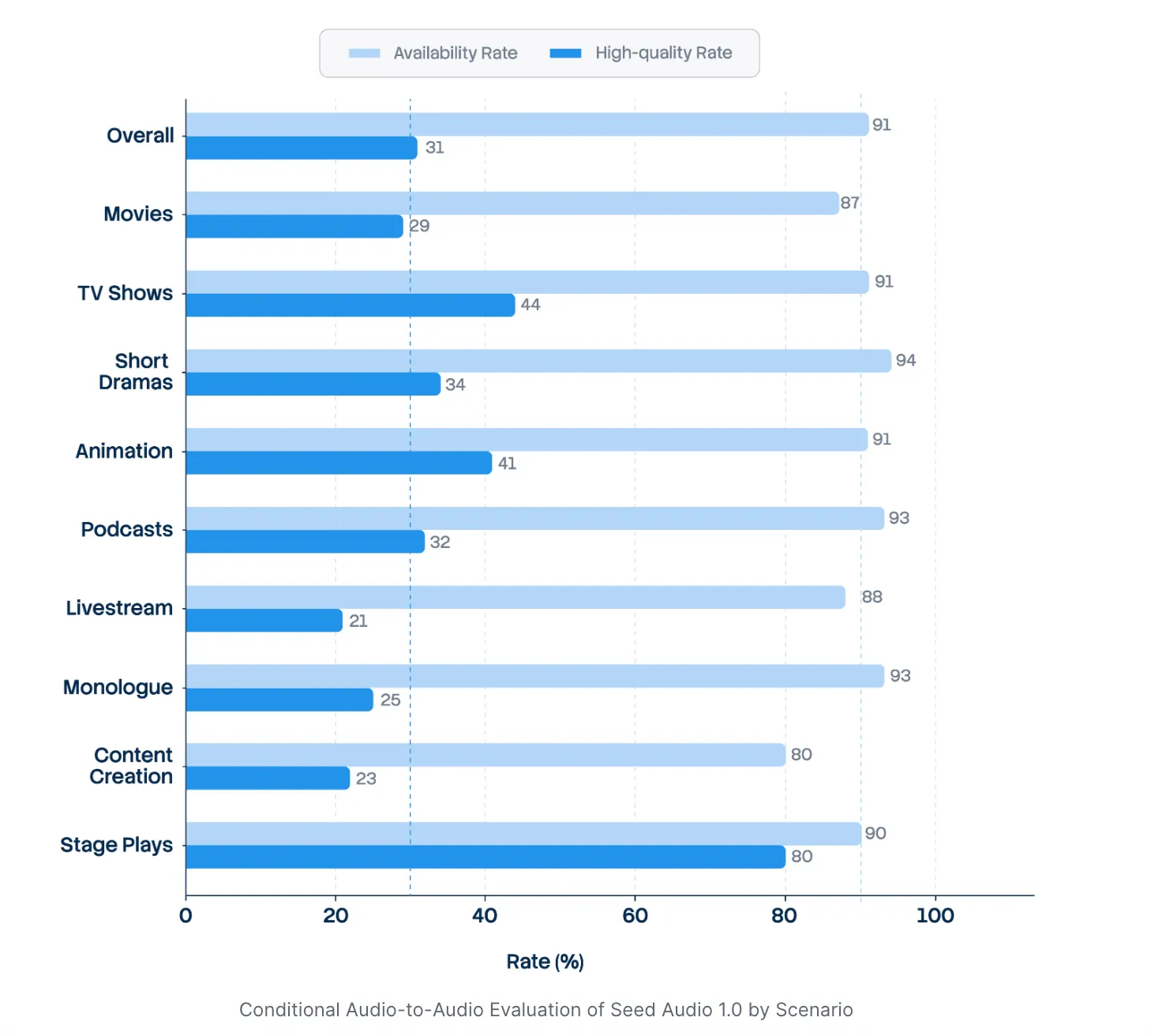
Seed Audio 1.0 is an AI audio creation model developed by ByteDance Seed. That description matters because Seed Audio 1.0 is not simply another AI voice generator.
A traditional text to speech model primarily answers one question: How should this text be spoken?
Seed Audio 1.0 works with a broader question: What should this entire moment sound like?
The prompt can include:
-
The number and identity of speakers
-
The tone, emotion, and delivery of each voice
-
The surrounding environment
-
Background ambience and sound effects
-
The order and timing of dialogue
-
The overall mood and narrative intent
The result is a coordinated audio scene rather than a collection of isolated clips.
Seed Audio 1.0 AI Audio Generator vs. Traditional Text-to-Speech
Text to speech remains useful for narration, audiobooks, accessibility, and straightforward voiceovers. But when a creator wants a conversation, a dramatic opening, or an immersive story, speech alone is only one layer of the final result.
| Capability | Traditional text-to-speech | Seed Audio 1.0 |
|---|---|---|
| Primary output | Spoken text | A coordinated audio scene |
| Multiple characters | Often generated separately | Can be directed within one scene |
| Emotion and performance | Depends on the voice model and controls | Shaped by character and scene context |
| Ambience and sound effects | Usually added afterward | Can be generated with the dialogue |
| Timing | Commonly adjusted in an editor | Dialogue timing can be described in the prompt |
| Creative workflow | Generate, assemble, and mix | Describe and generate the scene more holistically |
The difference is not that creators no longer need scripts or editing. The difference is that more of the intended performance and sound design can be expressed at the generation stage.
Key Features of the Seed Audio 1.0 AI Audio Generator
1. Full-Scene Audio Generation
Seed Audio 1.0 models voices, ambient sound, sound effects, and other audio elements together. This allows the model to consider how each part should interact within the same acoustic space.
For example, a creator could describe two hosts discussing a mystery in a quiet late night studio while rain falls outside and a distant clock marks a transition. The voices, pacing, ambience, and cues are treated as parts of one scene rather than separate assets that must be created independently.
This is especially relevant to narrative podcasts, fictional interviews, documentary openings, audio dramas, branded stories, and educational role-play.
2. Multi-Character Dialogue
A good multi speaker podcast needs more than different voice colors. Each speaker should have a recognizable role, personality, rhythm, and emotional relationship to the conversation.
Seed Audio 1.0 can generate character-based dialogue within a shared context. Because the speakers belong to the same scene, their turns can feel more connected than separately generated voice lines stitched together afterward.
Creators can describe one host as calm and analytical, another as curious and energetic, or a character as hesitant, amused, urgent, or restrained. That makes the model useful for formats such as:
-
Host-and-guest interviews
-
Two-person explainers
-
Debates and roundtable-style discussions
-
Fictional conversations
-
Teacher-and-student role-play
-
Character-led storytelling
3. Expressive Voices With Consistent Identity
Seed Audio 1.0 can shape a voice from a text description, an authorized reference sample, or both. It is designed to preserve a recognizable voice while changing its delivery across different emotions and situations.
This is important for longer stories. A character may begin with calm narration, react with surprise, speak urgently during a turning point, and return to a reflective tone at the end. The performance needs to change without making the character sound like a different person.
4. Audio Generation Across 20+ Languages
Seed Audio 1.0 supports more than 20 languages, including English, Chinese, Japanese, Korean, Spanish, Indonesian, German, French, Thai, and Vietnamese.
The goal is not just to translate words. A voice should also adapt to the pronunciation, rhythm, pacing, and expressive conventions of each language while remaining recognizable.
For podcast creators, educators, and global brands, this can make it easier to reuse one concept or character across multiple markets. A learning podcast could turn the same lesson into English, Spanish, French, and Japanese versions, while a brand could adapt a recurring host for regional campaigns.
Practical Ways to Use Seed Audio 1.0 in PodcastorAI
Narrative and True-Crime Podcasts
Create a documentary style opening with a narrator, a second character, environmental detail, and carefully placed sound cues. A scene can establish tension before the main discussion begins.
Educational Podcasts
Turn course notes or classroom material into a teacher and student conversation. Use distinct voices, clear pacing, and contextual sounds to make abstract ideas easier to follow.
Language-Learning Conversations
Generate role play based on realistic situations such as ordering food, preparing for an interview, or asking for directions. Different characters and expressive delivery can make listening practice feel closer to a real interaction.
Fictional Interviews and Audio Drama
Build character led scenes from an original script, with each voice responding to the same mood and environment. This can help independent creators prototype audio fiction without recording every role themselves.
Branded Podcasts and Ads
Create short, directed audio scenes for product stories, campaign intros, and branded content. Dialogue timing and scene-level sound can help a short segment communicate more than a standard voiceover.
Multilingual Podcast Versions
Adapt an episode for different audiences while preserving the identity and broad performance style of a recurring host or character.
How to Try Seed Audio 1.0 in PodcastorAI
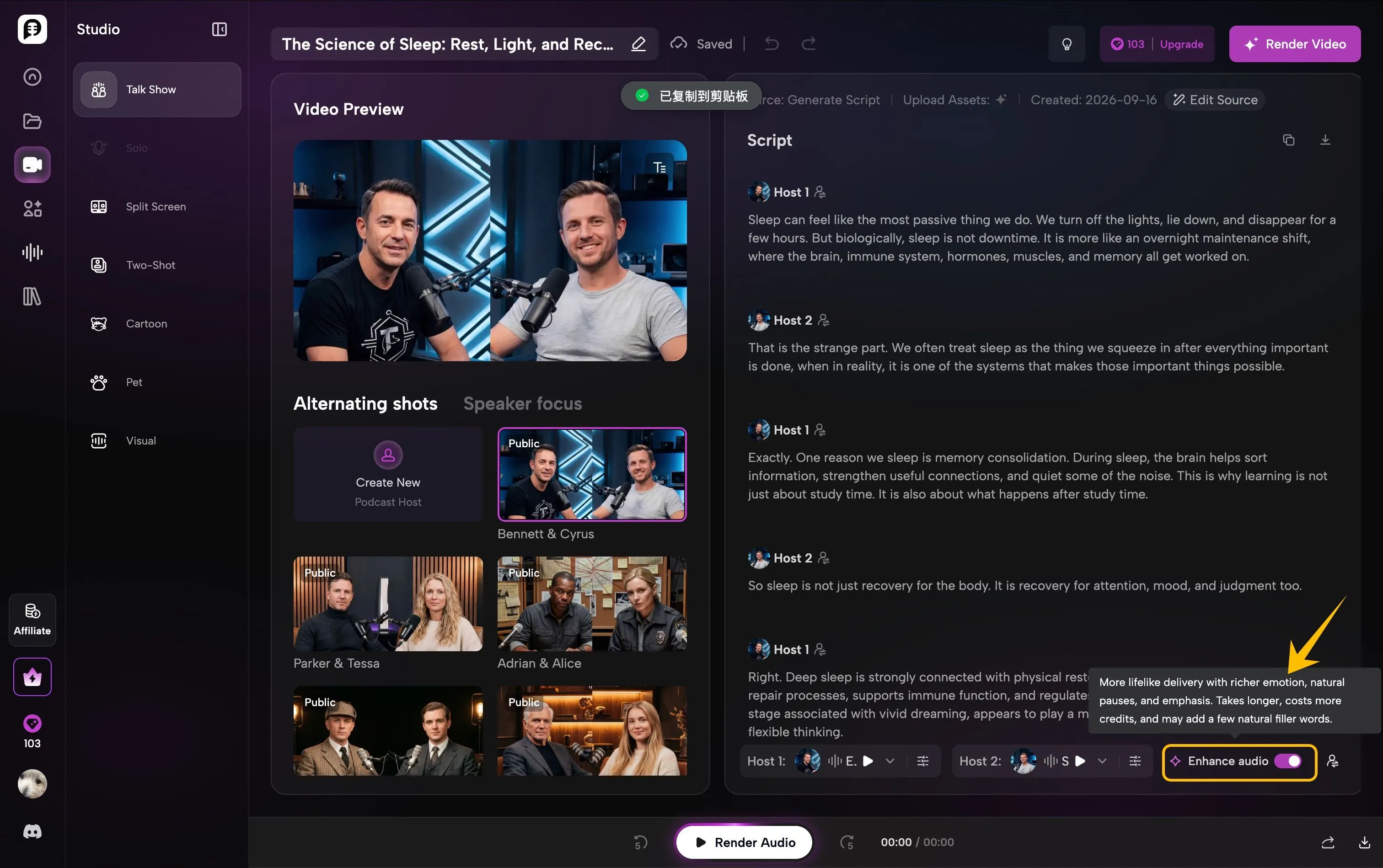
Seed Audio 1.0 is now available in PodcastorAI Studio. After generating or reviewing your podcast script, find the Enhance audio switch in the lower-right corner of the editor and turn it on before rendering.
With one click, PodcastorAI uses Seed Audio 1.0 to create more lifelike delivery with richer emotion, natural pauses, and expressive emphasis. This can make multi-host conversations sound more spontaneous, connected, and engaging.
Enhanced audio may take longer to generate, use more credits, and occasionally add natural filler words. Once you are ready, simply click Render Audio to experience your enhanced podcast.
Create More Than a Voiceover With an AI Audio Generator
An AI podcast should sound like a piece of content made for listening—not a document read out loud.
With the Seed Audio 1.0 AI audio generator now available in PodcastorAI, you can move from source material to structured dialogue, expressive voices, and richer audio experiences in one creative workflow.